Photo questions
Capture the question and its options together. Include every number, unit and symbol needed to solve it.
 BlueFlashTry BlueFlash ↗
YOUR AVIATION QUESTION SOLVER
A tricky MCQ. A calculation that will not click. A concept your notes cannot explain. Show BlueFlash the question—or ask it—and work towards understanding, not just an answer letter.
Open BlueFlash → Rapid Q → select your subject.
No signup for the first 10 minutes. Sign in to continue your remaining eligible trial. No card needed.
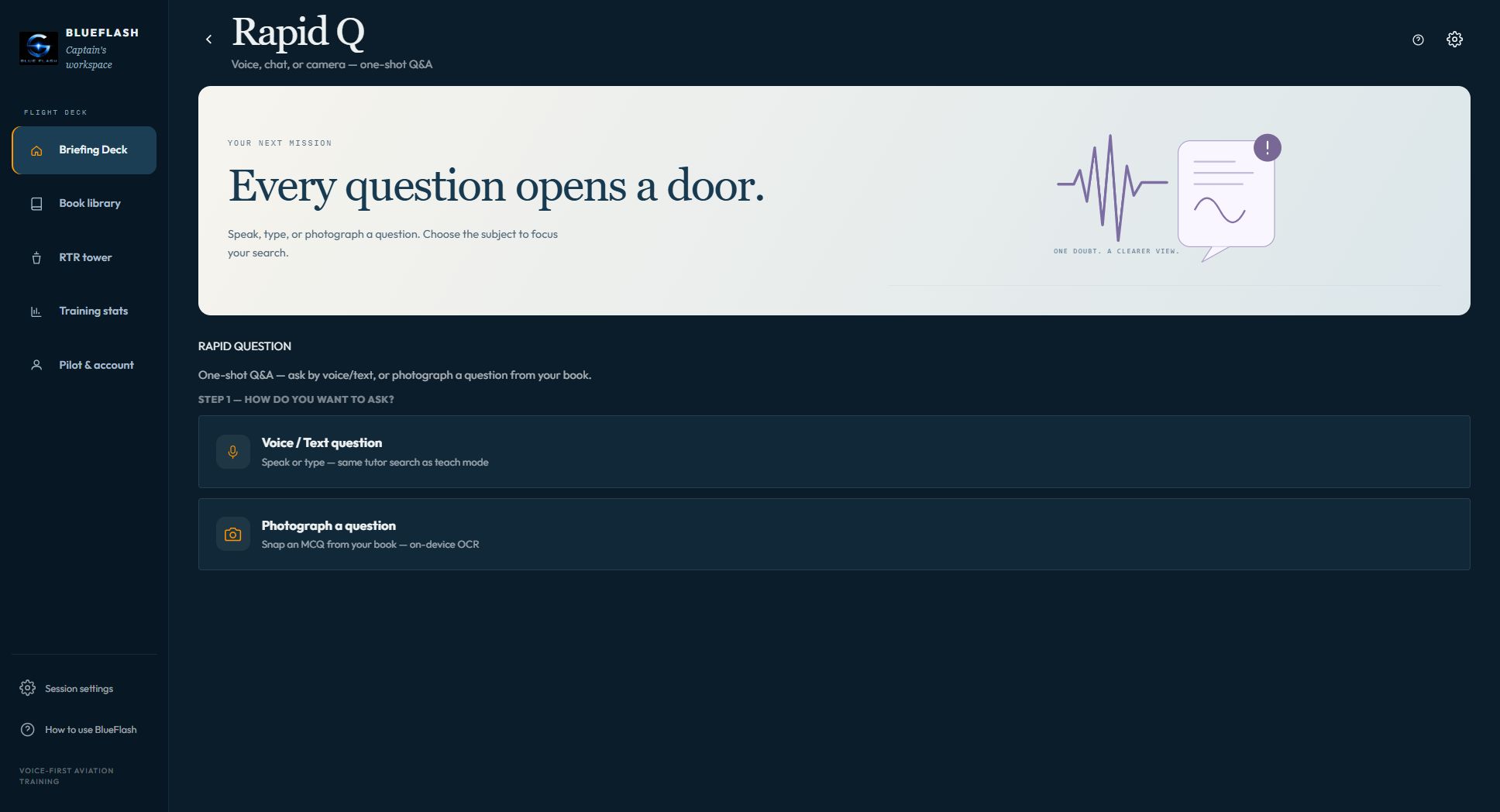
CAMERA TO CLARITY
No need to retype an entire MCQ. Use your camera or an existing photo, crop the question, check the recognised text and send it to the tutor in the subject you chose.
Capture the question and its options together. Include every number, unit and symbol needed to solve it.
Bring navigation, fuel, time, distance, mass-and-balance or performance calculations. Ask for the formula, substitutions and units—not just the final value.
Ask why an option fits, why another does not, or which assumption changes the result. Keep the conversation on the same doubt.
Clear photographs work best. Review OCR text before sending: a misread decimal or minus sign can change the answer.
SUBJECT-FIRST RESEARCH
Pick Navigation, Meteorology, Regulations, Technical or another available library subject. Rapid Q searches the indexed books in that selection, pulls relevant material and uses it to build an explanation.
TRY ASKING
Or: “What is the difference between phase and frequency?”
Or: “Here is my fuel calculation. Which step or unit have I got wrong?”
Navigation · Meteorology · Regulations · Technical
Available subjects depend on the current BlueFlash library.
AN ORIGINAL PRACTICE EXAMPLE
Time = distance ÷ groundspeed
= 30 ÷ 180 hours
= 1/6 hour = 10 minutes
The useful part is the units: knots are nautical miles per hour. Converting hours to minutes is a separate step.
Illustrative calculation—not an official examination question or a claim about every AI response.
FROM NUMBER TO KNOW-HOW
“Why do we multiply by 60?” “What if I use airspeed instead?” “Explain this from the basics.” Bring your own wording and use follow-ups to understand the method.
Rapid Q supports numerical reasoning and formulas. Check the given data, assumptions and result against your book or instructor—AI can make mistakes, especially with unclear scans or incomplete questions.
ONE DOUBT. FOUR SIMPLE STEPS.
Choose Rapid Q on the BlueFlash Briefing Deck.
Voice/text for a conversation, or Photograph a question for a scan.
Focus the search on the available books relevant to your question.
Read or listen to the reply, then ask about a formula, step or concept.
ONE WORKSPACE / DIFFERENT MISSIONS
Rapid Q is your focused question desk. Teach walks through a book. Exam gives you practice with scoring. RTR rehearses radio exchanges. Use the mode that fits the task in front of you.
BEFORE YOUR FIRST QUESTION
Yes. Rapid Q has a photo-question workflow, and the tutor supports calculations. Include the full question, options, numbers and units, and correct any scanning errors before sending. Ask for the method when you need more than the answer.
Rapid Q focuses on BlueFlash's indexed library books in your selected subject. It is an aviation study tool, not a promise of unrestricted web research or access to every textbook.
Yes. Ask for more detail, question an assumption, or request an explanation of a step in the conversation. You do not need to open a chapter just to ask one doubt.
Typed questions do not need a microphone. For photo questions you can use a camera or an existing picture. Voice requires microphone permission; availability depends on your browser and device.
Your first 10 minutes are available without signup. Sign in when prompted to continue the remaining eligible trial. Paid plans are separate.
No. BlueFlash is independent study software. AI answers and scanned text can be wrong; check important answers against your reference material. It is not for flight operations and does not replace your instructor or current official requirements.